2005-10-22

Omroep.nl direct video link user script

This one is for the Dutch readers:

Ik kijk vaak televisie op uitzendinggemist.nl. Al geruime tijd was ik me aan het ergeren aan het feit dat de video's in een popup getoond worden. Het was dus weer eens tijd om een Greasemonkey user script te schrijven.

Het omroep.nl video's direct linken user script is gister geboren. Het opent breedband RealVideo video’s direct in de RealPlayer in plaats van in de gehate popup.

0.5

  • Bij een Window Media Player video krijg je geen wit scherm meer, maar blijf je op de huidige pagina.
  • In overzichten is een checkbox toegevoegd waarmee je de lijst tot de afgelopen week kunt beperken.
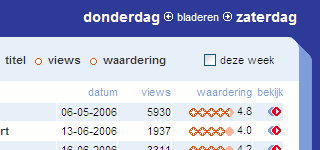
    Checkbox beperking afgelopen week

0.4

Aangepast voor de vernieuwde uitzending gemist site.

0.3

  • Er wordt niet meer aangenomen dat een video bb.iets.rm heet. Door deze aanname konden nieuwe video's van de VPRO niet bekeken worden.
  • Als er een directe link naar een video (rm of asf) gemaakt kan worden wordt dit (nu beter) gedaan. Dit is handig op bijvoorbeeld tv op je pc.
  • Als er via de uitzendinggemist-mediaplayer (de popup) geen breedband rm-video gevonden wordt (Avro.. grr) dan wordt de asf-versie gepakt.
  • Op de site van de Lama's wordt de functie die een popup verzaakt als je een aflevering wilt kijken overschreven door een functie die de video direct toont.

0.2

Aangepast voor de Greasemonkey 0.6.4.

0.1

Eerste versie.

2005-10-10

Using CSS to display accesskeys

Reading Going to Print by Eric Meyer I discovered the CSS attr function. Eric used it to show the href attribute for anchors in the print style sheet. You can also use this function to show accesskeys in the screen style sheet:

a[accesskey]:after {
  text-transform: uppercase;
  content: ": " attr(accesskey);
}

2005-10-09

CSS styling definition lists

Richard informed me he had problems styling the definition list used in my custom Blogger comments form in combination with Blogger backlinks.

He is using using absolute positioning, a styling method I explained in my post on semantic forms:

form dt {
  position: absolute;
  z-index: 2;
}

form dd {
  position: relative;
  padding-left: 100px;
}

Absolute positioning may get you in trouble some times. Another way of styling definition list is by floating the definition title in the left margin of the definition data:

form dt {
  float: left;
  width: 95px;
  white-space: nowrap;
  overflow: hidden;
}

form dd {
  margin-left: 100px;
}

Note: floating may get you in trouble some times as well. Just try which method suites you best.

Blogger backlinks the custom way

Blogger now offers backlinks. It's a sort of trackback system, but not quite.

Blogger has put a help article online on how to enable backlinking. Read it if you want to use the non custom Blogger version of backlinking. If you want custom backlinking just paste these bits of code to your template (you don't need to make the settings described in the help article).

On your MainOrArchivePage (after the link to the comments for example):

<script type="text/javascript">
//<![CDATA[
if (! BL_BacklinkCount) var BL_BacklinkCount = new Array();
BL_BacklinkCount['<$BlogItemNumber$>'] = document.createElement('span');
//]]>
</script>
<script type="text/javascript" src="http://www.blogger.com/dyn-js/backlink_count.js?blogID=<$BlogID$>&postID=<$BlogItemNumber$>"></script>
<script type="text/javascript">
//<![CDATA[
document.write(
  ' &middot; <a href="<$BlogItemPermalinkUrl$>#backlinks">Backlinks: '+
  BL_BacklinkCount['<$BlogItemNumber$>'].innerHTML +'</a>'
);
//]]>
</script>

Update 2006-01-07: I did a rewrite to speed this part up.

On your ItemPage (after the comments for example):

<script type="text/javascript">
//<![CDATA[
var BL_Backlinks = new Array();
//]]>
</script>
<script type="text/javascript" src="http://www.blogger.com/dyn-js/backlink.js?blogID=<$BlogID$>&postID=<$BlogItemNumber$>"></script>
<script type="text/javascript">
//<![CDATA[
if (BL_Backlinks && BL_Backlinks.length) {
  document.write('<div id="backlinks"><a name="backlinks"></a><h3>Backlinks</h3><dl>');
  for (var i = 0; i < BL_Backlinks.length; i++) {
    document.write(
      '<dt><a href="'+ BL_Backlinks[i]["BlogBacklinkURL"] +'">'+ BL_Backlinks[i]["BlogBacklinkTitle"] +'</a></dt>'+
      '<dd>'+ BL_Backlinks[i]["BlogBacklinkSnippet"] +'<a name="t'+ i +'"></a><p>'+
      BL_Backlinks[i]["BlogBacklinkAuthor"] + ' &middot; '+ BL_Backlinks[i]["BlogBacklinkDateTime"] +'</p></dd>'
    );
  }
  document.write('</dl></div>');
}
//]]>
</script>

Here is an example page with backlinks.

2005-10-08

Form data rescue user script

I wrote my own Form data rescue user script after some problems loosing data.

This week I was internet banking. After I had all the transaction information (including a 16 digit number) the internet banking site came up with a lame error. I've had this error before and knew that you'd just have to try it again. Too bad all the form data was gone.

Last week I had the same problem when I was writing a post to my personal blog: Blogger came up with an error and all the data was gone. Recover post also didn't work.

After the internet banking incident I knew I needed a Greasemonkey user script. On Userscripts.org I found the Auto save forms user script. This script has two down sides:

  • The data is cleared when the form is submitted.
  • The data is stored in a cookie, which are limited in number and per cookie data.

So I wrote my own Form data rescue user script. Features:

  • Data is (permanently) stored using GM_setValue.
  • Data will not be cleared when the form is submitted.
  • The rescue function is placed in the User Script Commands menu (under Tools).

Screenshot

This script has a down side as well. I have chosen not to include all sites for this script since all the data will remain stored. If you would like data storage for a limited time, please check the Auto save forms user script.